The Fastest Batch Photo Editor for Mac. Edit 500 Photos While You Grab Coffee.
Beautifully simple. Brutally powerful. Refine exposure, color, and tone across hundreds of photos at once, then spot-remove blemishes, distractions, and backgrounds in seconds. All on your Mac, zero cloud.
RapidPhoto Pro · $29.99 lifetime · One payment, yours forever.
Mac App Store
Trusted, verified, and always up to date. Just download and run.
100% On-Device
Your photos never leave your Mac. Total privacy, guaranteed.
Up to 500 Photos at Once
Drop your shoot folder. Handles up to 500 photos at once.
Free to Start
Try all features free. No account, no credit card needed.
One app for your entire photo workflow
100+ effects. 5 AI tools. 9 export formats. All running on device.
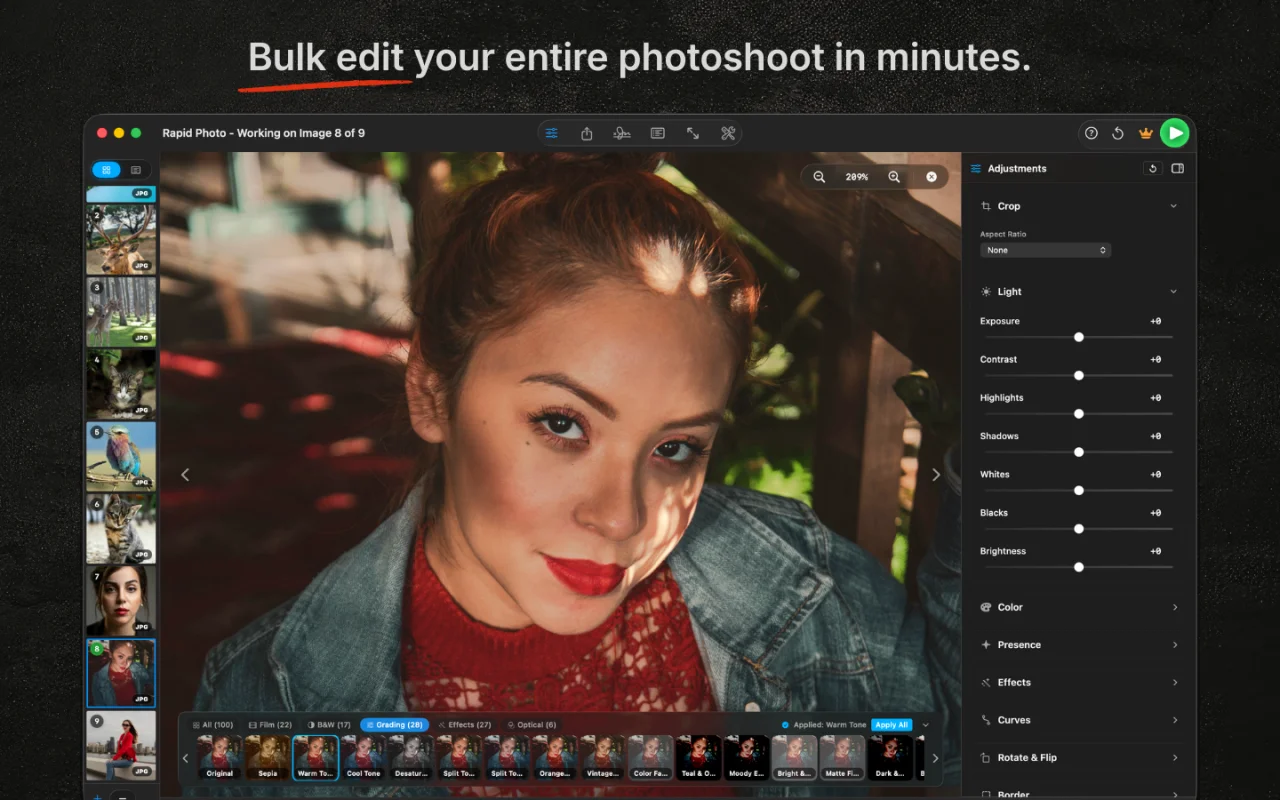
Bulk edit your entire photoshoot in minutes
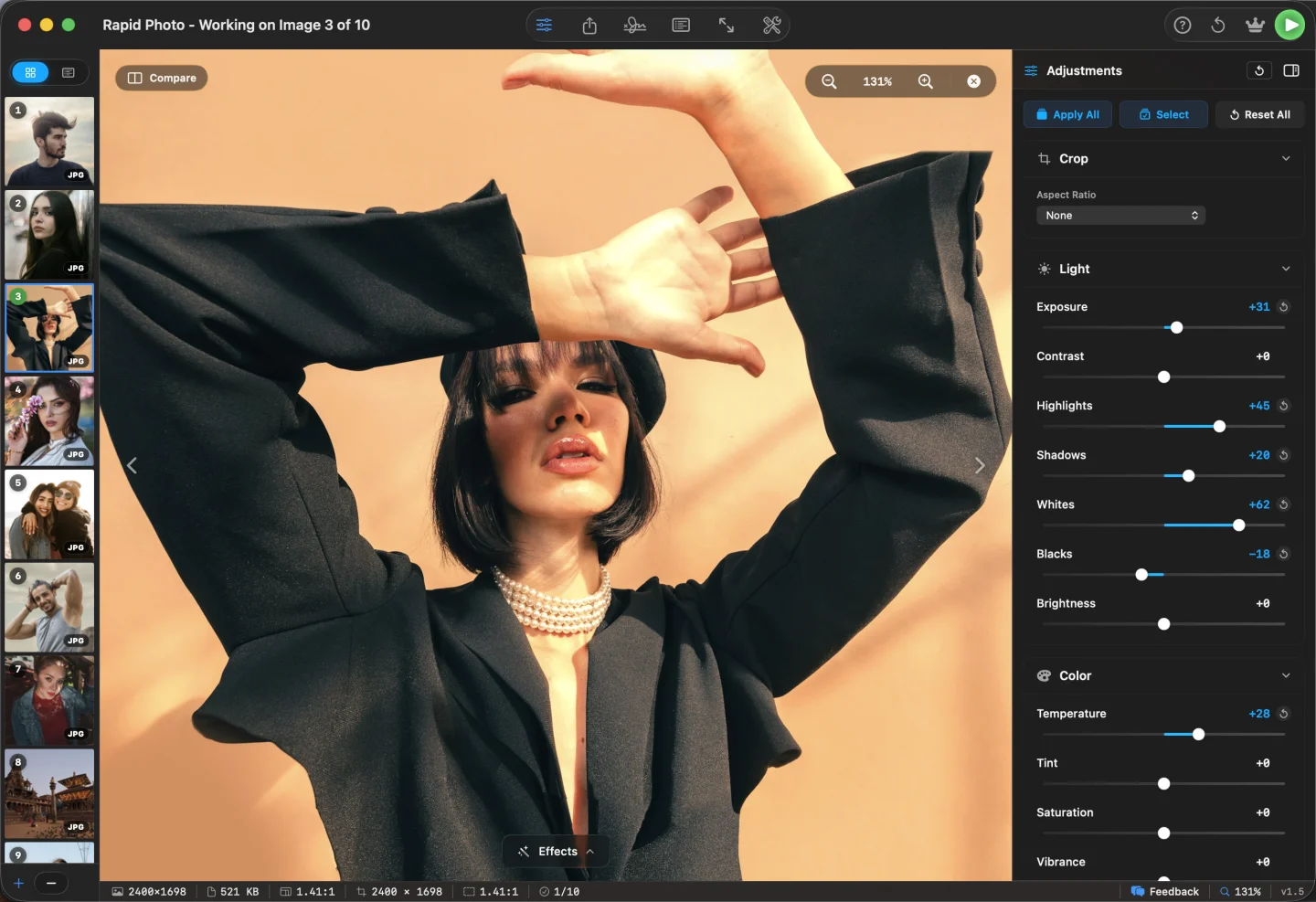
Drop a folder of up to 500 photos, or import straight from Apple Photos, and get a full editor for every shot at once. Exposure, contrast, highlights, shadows, whites, blacks, temperature, tint, vibrance, saturation, clarity, dehaze, texture, sharpness, noise reduction, grain, bloom, and vignette. GPU-accelerated across the whole batch in seconds.
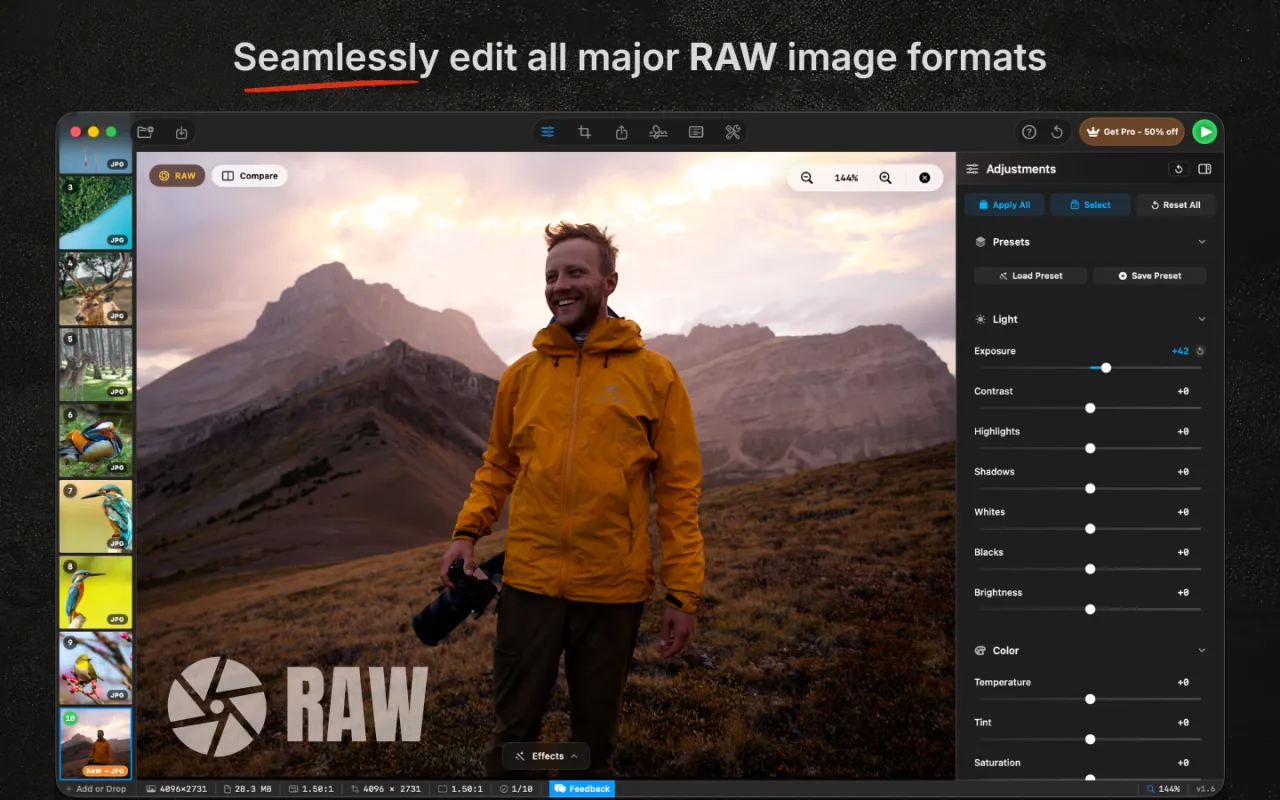
Edit RAW files from every major camera
Drop in CR2, CR3, NEF, ARW, RAF, ORF, RW2, PEF, DNG, 3FR, IIQ, X3F, or Apple ProRAW straight from card. Canon, Nikon, Sony, Fujifilm, OM System, Panasonic, Pentax, Leica, Hasselblad, Phase One, and Sigma. Full 16-bit pipeline preserved. Optimized for Apple Silicon, so 60 MP RAW files load instantly.
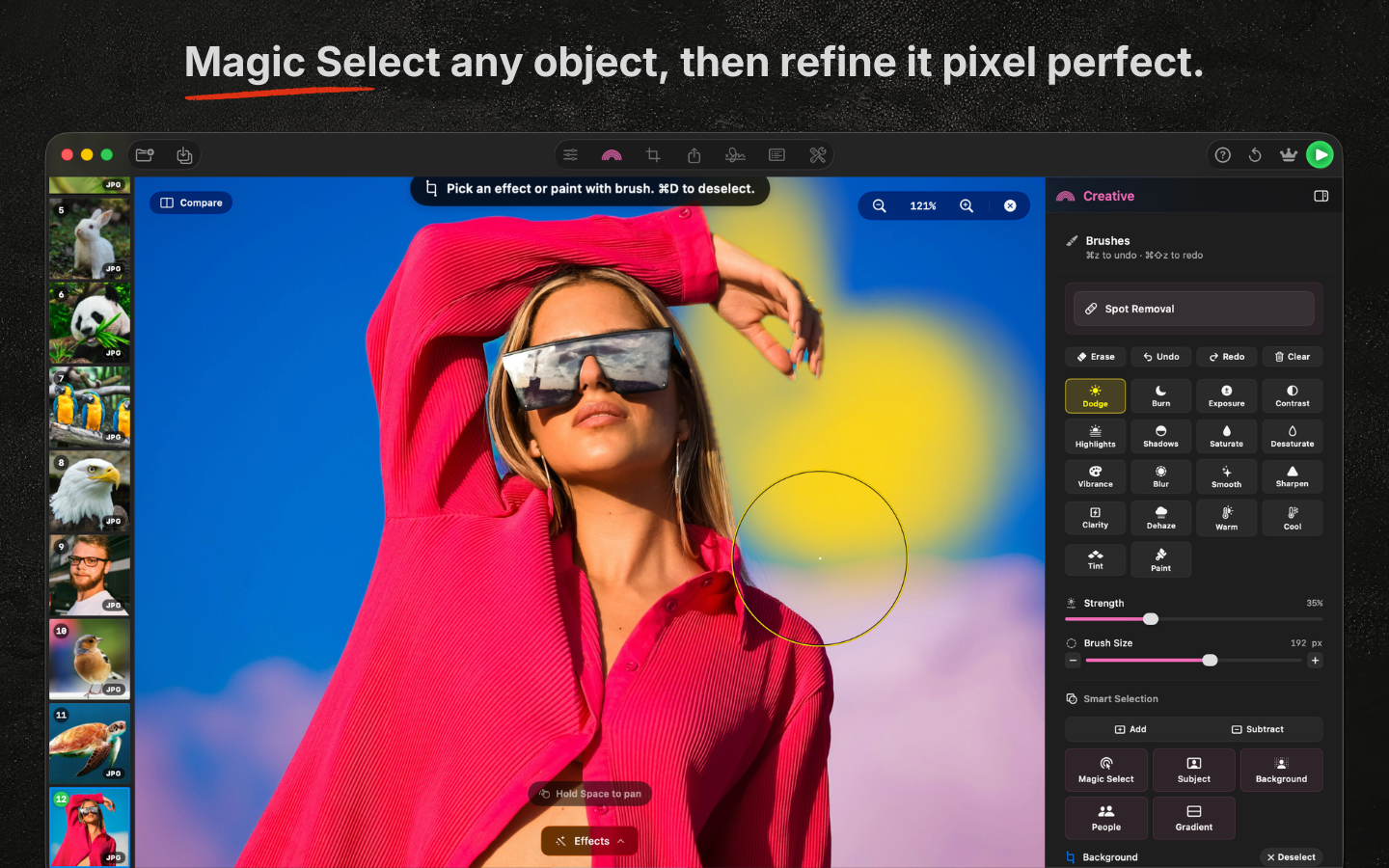
Creative Panel for local retouching
Spot-remove blemishes with a Photoshop-style healing brush. Paint with 10 brushes (Dodge, Burn, Blur, Smooth, Sharpen, Clarity, Warm, Cool, Saturate, Desaturate) plus Tint, Paint, and Lip Color. Mask with AI Subject, Background, and People selection. Lightroom-style Linear Gradient and Portrait Retouch via face detection, with per-stroke undo and redo.
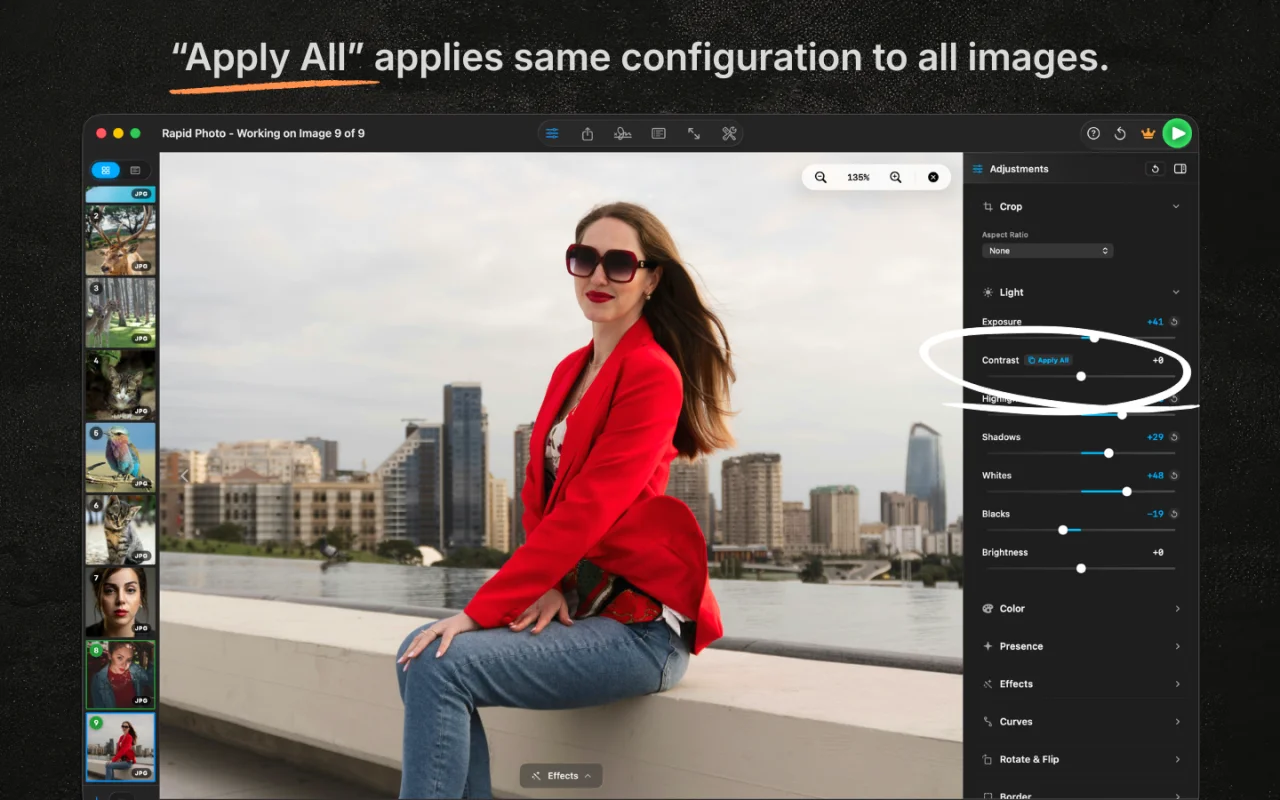
Apply All pushes one edit to every photo
Get a single image looking just right, then hit Apply All. Every adjustment, tone, color, crop, effect, watermark, and metadata propagates across the entire batch with a single click. Consistent results without touching each file, and you can selectively skip any image you want to keep untouched.
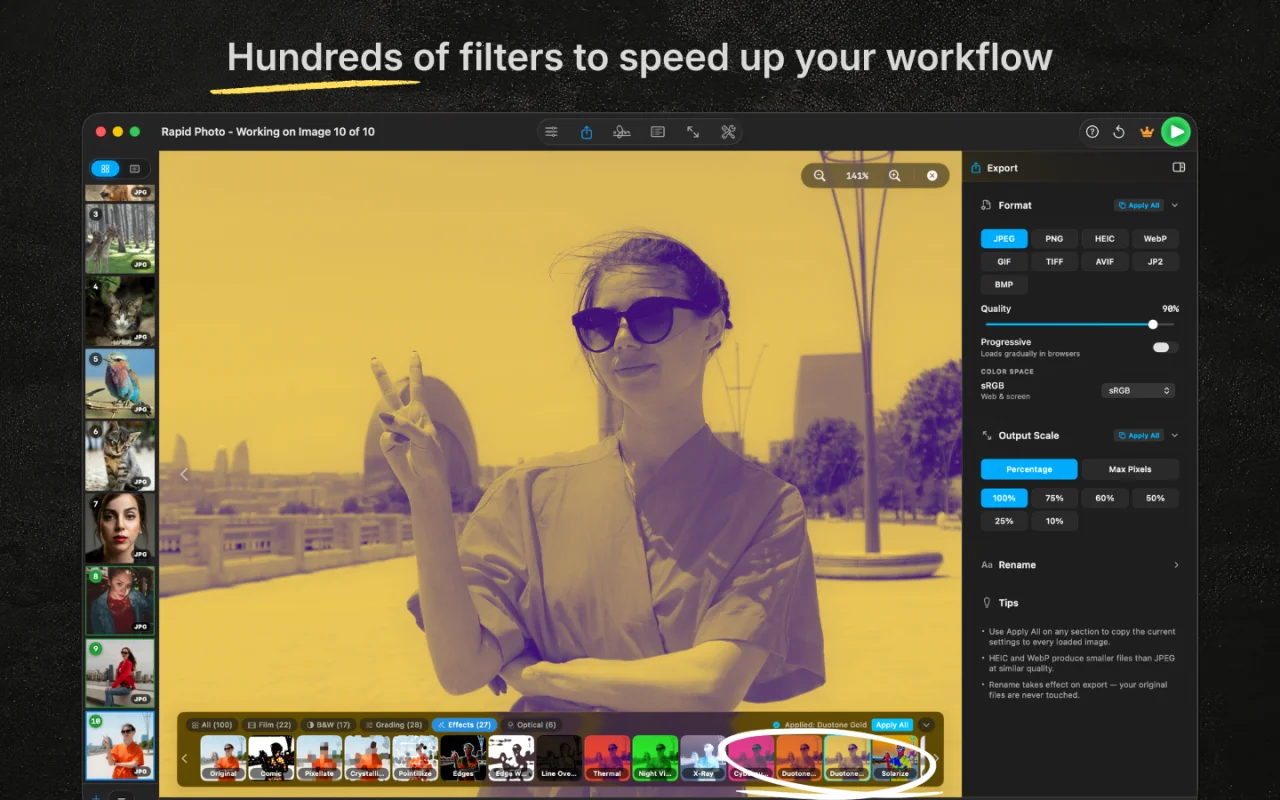
100+ filters and film stock emulations
100 built-in effects across four families. 44 film stocks (Portra, Ektar, Pro 400H, Velvia, Kodachrome, CineStill 800T, Tri-X, HP5 Plus), color grades (Teal and Orange, Moody Editorial, Vintage Fade), monochromes (B&W, Sepia, Cyanotype, Platinum), and stylize looks (Rose Gold, Neon Glow, Halation). One look across every photo in the batch.
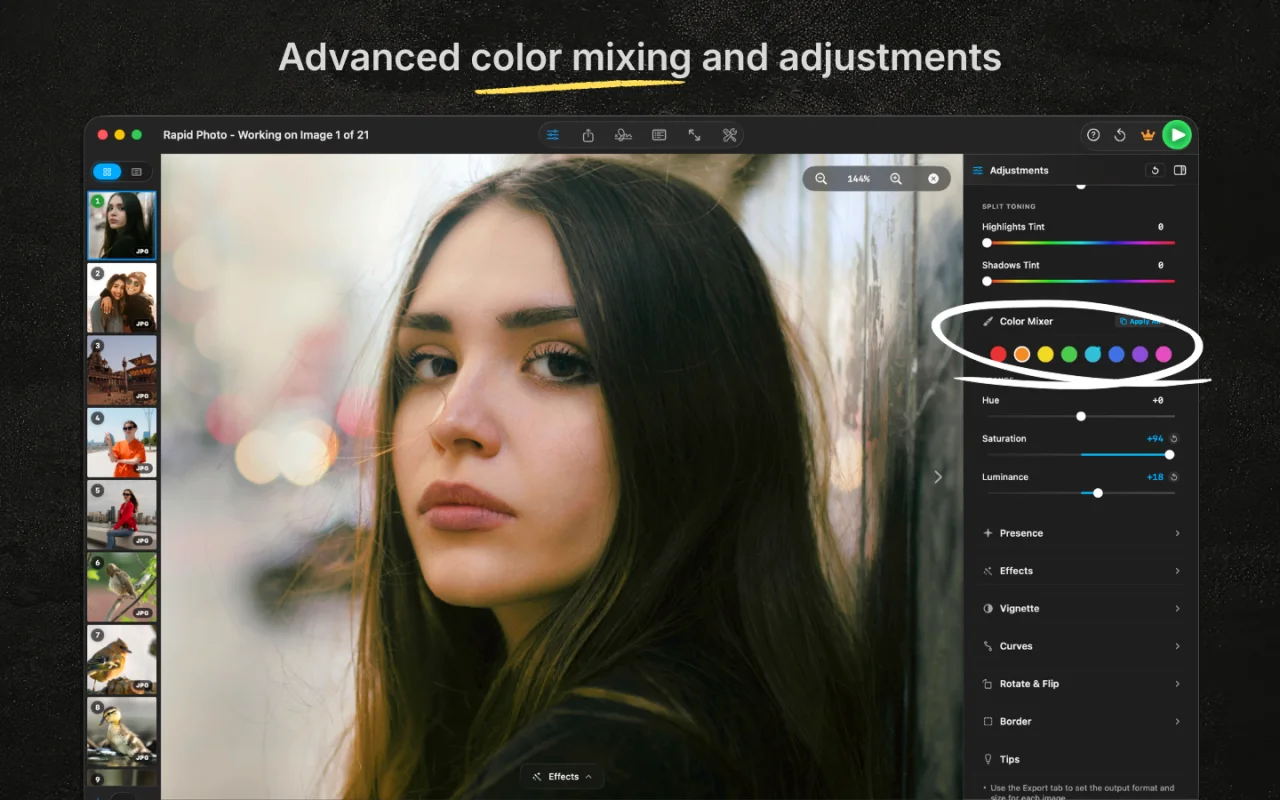
Advanced color mixing and fine adjustments
Sculpt every hue with an 8-band HSL color mixer for hue, saturation, and luminance per color. Shape tones with 5-point curves across shadows, midtones, and highlights, and split-tone each tonal range independently. Professional-grade color control, applied to every image in the batch in a single pass.
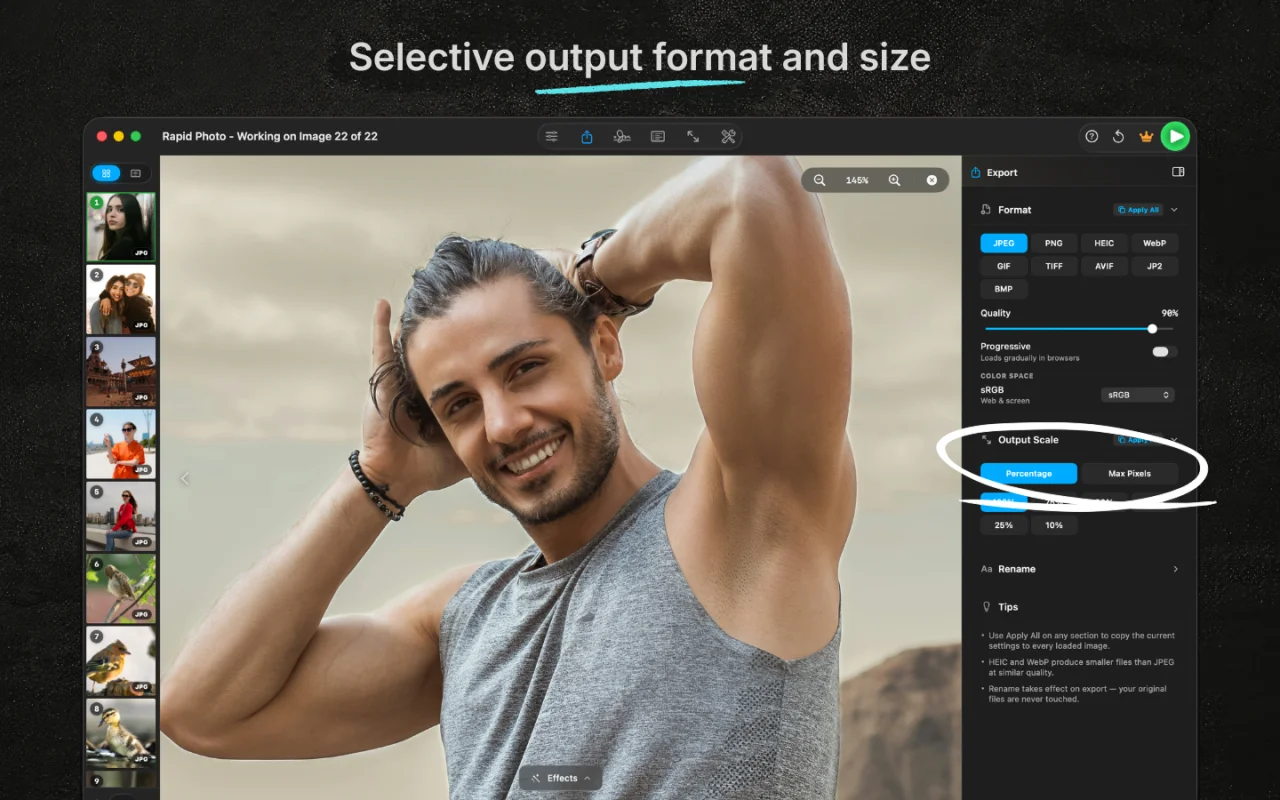
Export to any format, quality, or size
Export to 9 formats (JPEG, PNG, HEIC, WebP, AVIF, TIFF, GIF, BMP, JPEG 2000) across 3 color spaces (sRGB, Display P3, Adobe RGB). Scale by percentage or max dimension, tune quality, choose lossless or progressive encoding, and save your entire batch with a single click to any destination folder.
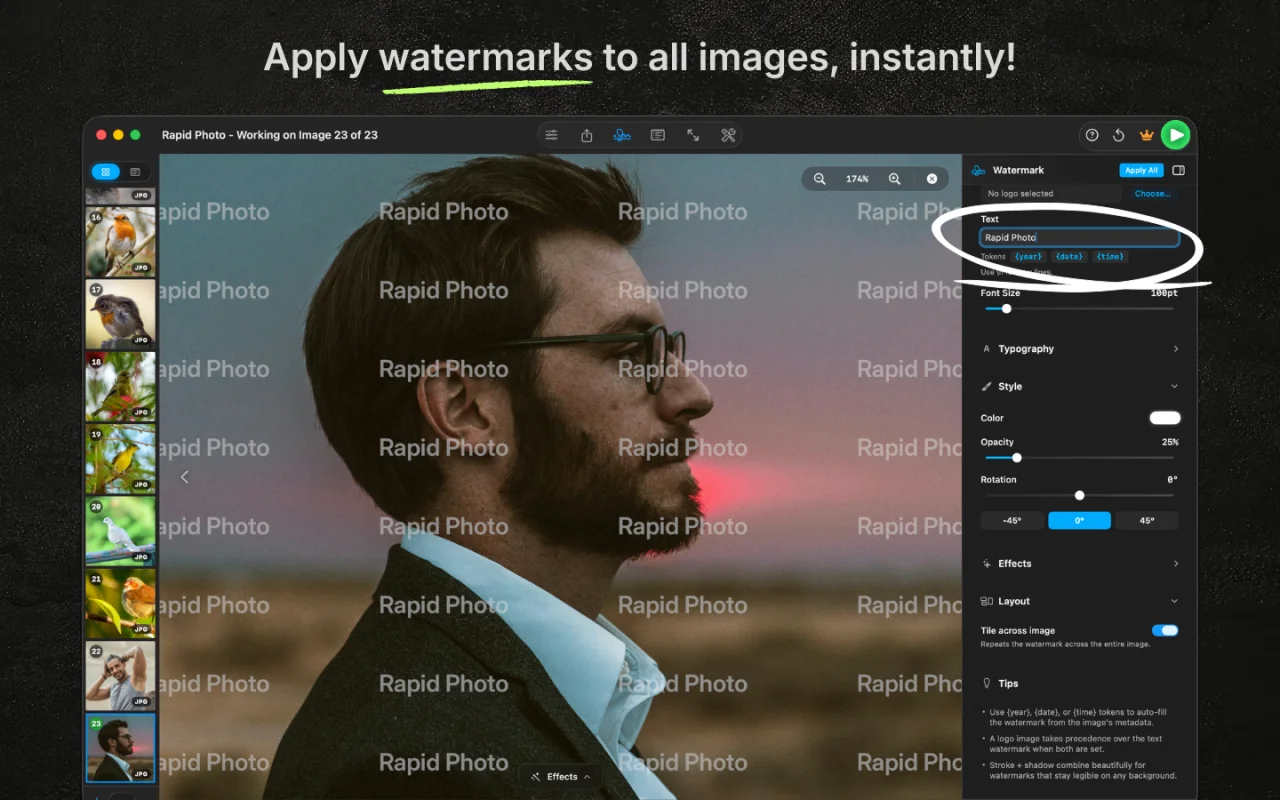
Watermark hundreds of photos instantly
Text or image watermarks with 48 fonts and full typography control. Drop into a 9-position grid, or tile a repeating pattern across the canvas. Fine-tune opacity, rotation, drop shadows, outlines, padding, and background boxes for any look. Applies to the whole batch in a single pass.
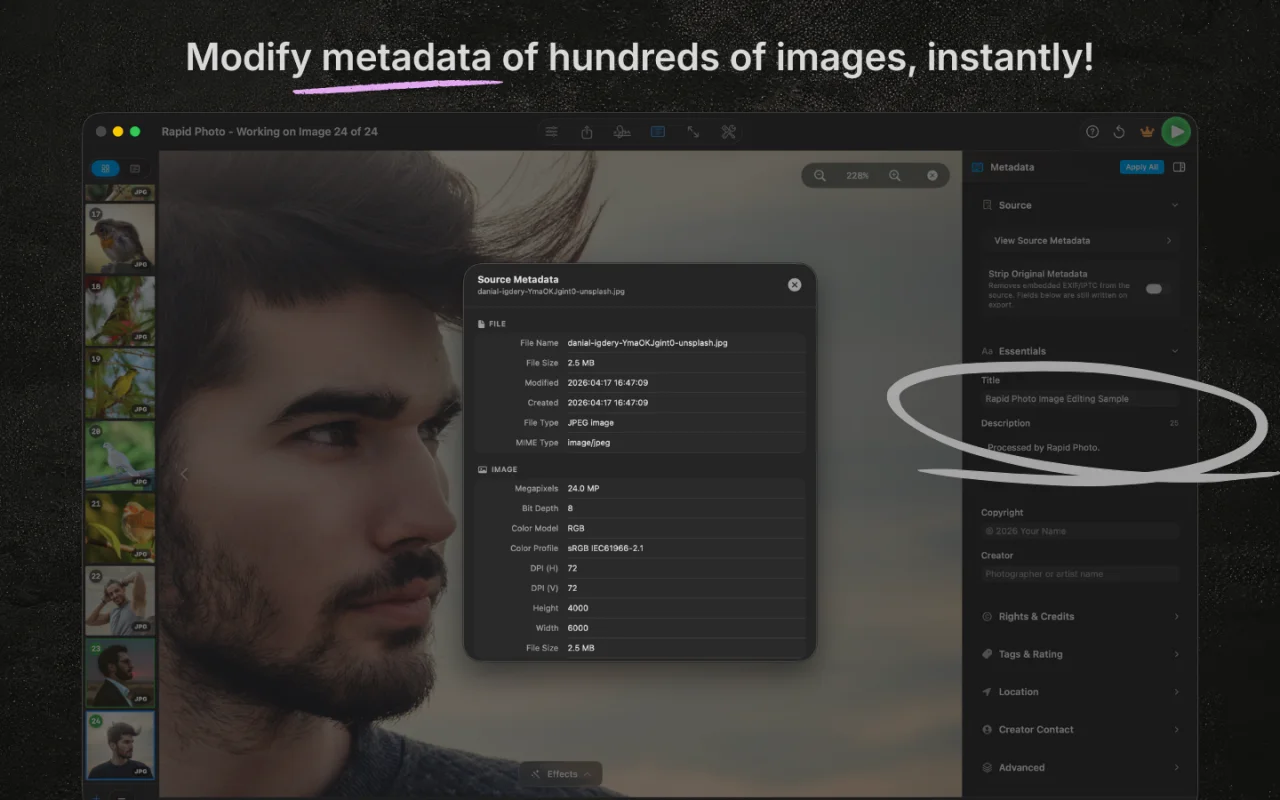
Edit IPTC metadata and rename in bulk
Inspect and update source metadata in place. Embed full IPTC 2025.1 fields (title, description, copyright, creator, GPS, keywords, AI disclosure) across every image. Batch-rename with custom prefix, base name, date stamps, and sequential numbering, all with live preview. Full EXIF preservation when you want it.
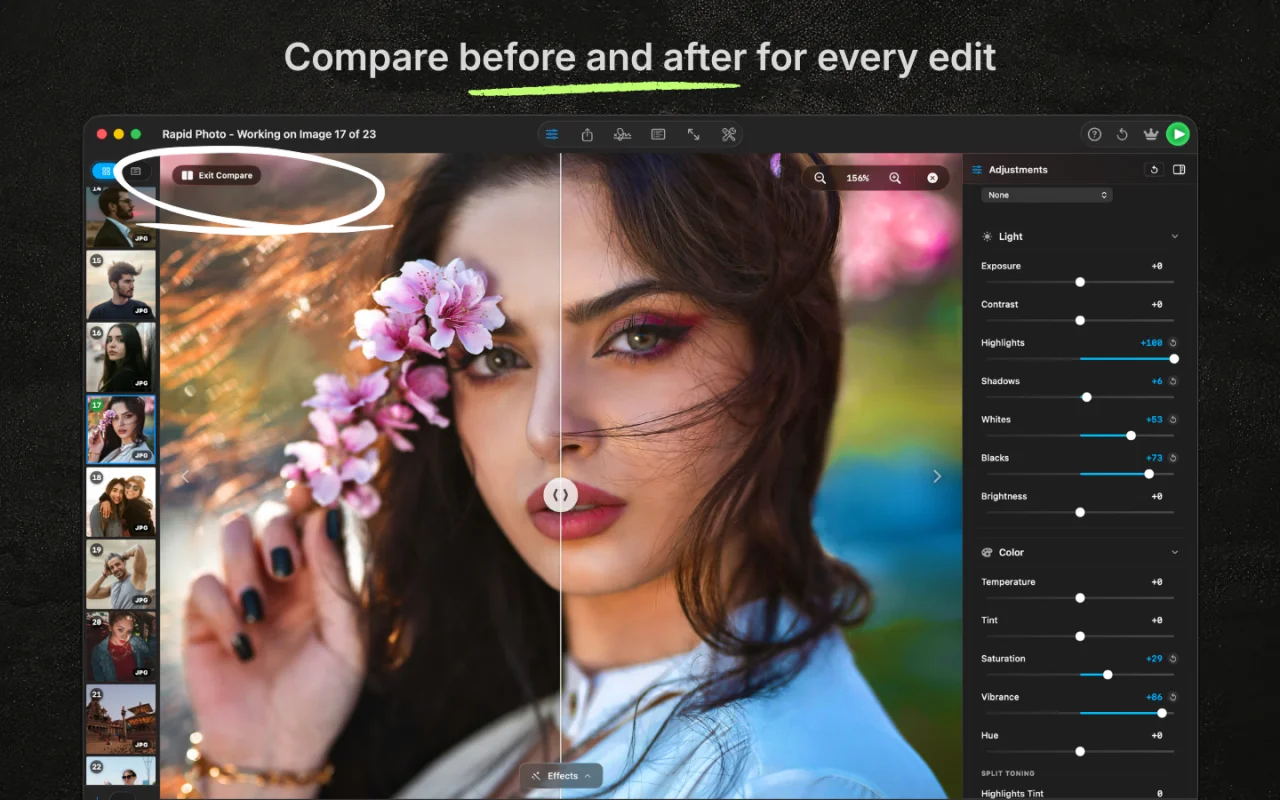
Compare before and after for every edit
Toggle a split view on any image to see exactly what changed before and after. Sanity-check your adjustments at any point, on any photo in the batch, with a single keystroke. Nothing is committed and nothing is destructive until you choose to export to your final format.
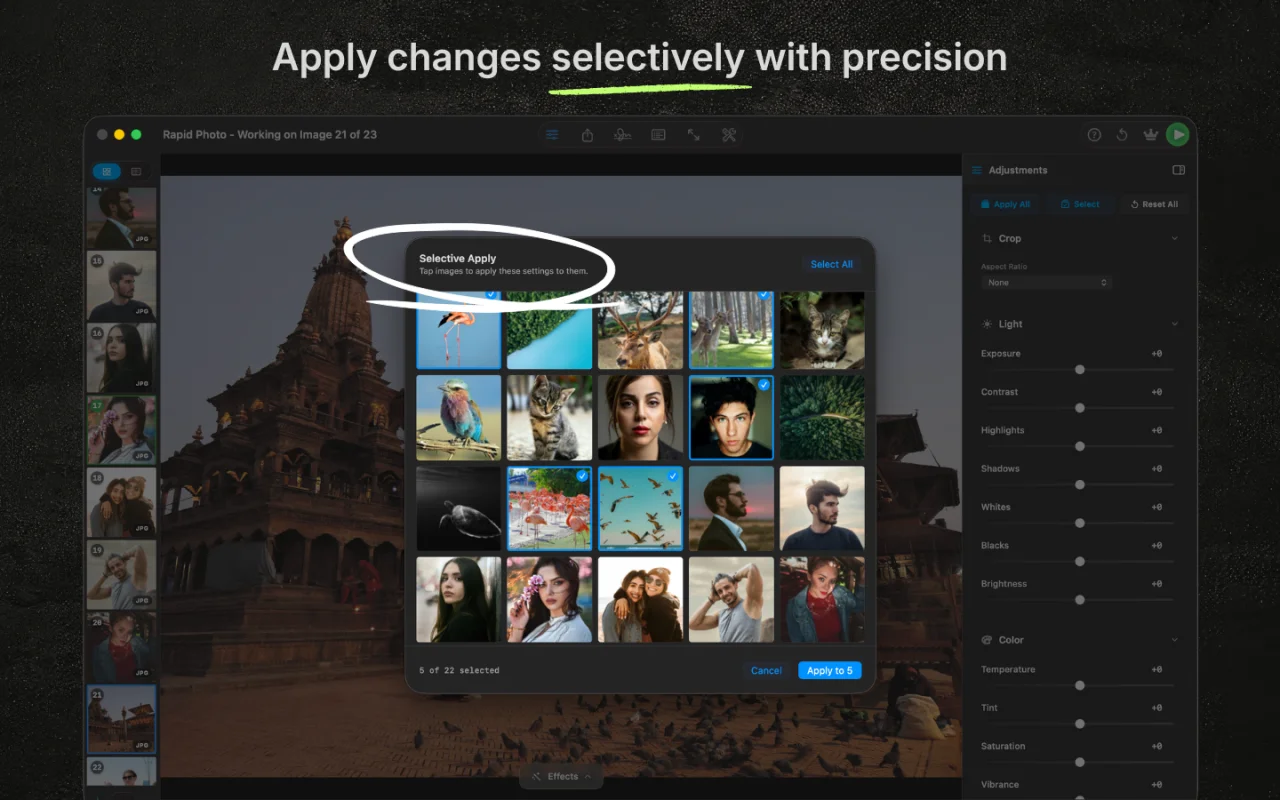
Apply changes selectively with precision
Need edits on some shots but not others? Pick exactly which images to process from a visual grid. Select individual files, invert the selection, or batch them by look. Your edits only land where you want them, and skipped photos pass through to export untouched.
And a lot more under the hood
Every detail you'd expect from a pro batch editor, plus a few you wouldn't.
Portrait Panel
- • Eye Makeup with 12 shadow shades plus custom colors
- • Eyebrow recolor across 6 natural shades
- • Lipstick presets with adjustable intensity
- • Cheek Blush with natural blending and custom tones
- • Eye bag lightening and iris contrast enhance
On-device AI
- • Real-ESRGAN AI upscaling at 2× and 4×
- • Background removal for any subject
- • Face detection and one-tap blur for privacy
- • OCR text extraction from any photo
- • Runs entirely on Apple Vision and Core ML
Smart Cropping
- • 16 aspect ratio presets plus freeform crop
- • Rule of thirds, golden ratio, diagonal grids
- • Drag-to-crop with real-time horizon straighten
- • Per-image or batch-wide crop in one pass
- • On-canvas before and after preview
Keyboard Shortcuts
- • ←/→ to navigate, ⌘←/⌘→ to jump to first or last
- • D to mark done, Delete to remove
- • ⌘O to open files, ⌘⇧O to import from Apple Photos
- • ⌘S to save, ⌘E to export
- • Full keyboard-first workflow for fast review
Built for Mac
- • Native SwiftUI on macOS 13 Ventura and later
- • GPU-accelerated on Apple Silicon M1 through M5
- • 60 MP RAW files load and respond instantly
- • App Sandbox with the minimum permissions needed
- • One-time purchase, no subscription, lifetime updates
Privacy and Data
- • Zero cloud uploads on any operation, ever
- • All AI inference runs on your Mac, offline
- • GDPR-compliant anonymous analytics only
- • No account, no sign-in, no tracking on photos
- • Your images stay on your device, always

What is RapidPhoto?
RapidPhoto is a modern, blazing-fast native batch photo editor for Mac that processes up to 500 photos at once, 100% on device.
Save hours on photo editing. Built with Swift 6 and optimized for Apple Silicon, RapidPhoto processes hundreds of photos in seconds, not hours. Get professional batch cropping, resizing, watermarking, renaming, format conversion, RAW input from every major camera (Canon CR2/CR3, Nikon NEF, Sony ARW, Fujifilm RAF, OM System ORF, Panasonic RW2, Leica/Apple ProRAW DNG, and more), and powerful on-device AI (background removal, face blur, Real-ESRGAN upscaling, OCR, QR/barcode detection) all in one lightning-fast app. No waiting. No cloud uploads. No subscriptions. Start free with 10 images per batch; upgrade once with RapidPhoto Pro ($29.99 lifetime) to unlock 500-image batches, 100+ professional effects, 40 film stocks, 14 crop ratios, 25+ fonts, and 9 export formats. Your photos stay private: processed entirely on your Mac, never uploaded.
Swift 6
Blazing fast performance with guaranteed memory safety.

Apple Silicon
Optimized for M1/M2/M3/M4/M5 native performance.
GPU Accelerated
Hundreds of photos processed in seconds.
Your photos never leave your Mac
No account. No photo uploads. Fully sandboxed, including AI upscaling and face detection. Your images stay on your machine, always.
Ready to speed up your workflow?
Download free. Upgrade to Pro for $29.99. One payment, yours forever.
Download for MacFree · macOS 13+ · No account needed
Built for people who work with lots of photos
Whatever your workflow, RapidPhoto handles the repetition so you don't have to.
E-commerce sellers
Save hours every week. Edit 500 product photos in minutes instead of days.
Photographers
Deliver shoots same-day. Batch edit to specs faster than clients expect.
Content creators
One click, all platforms. Optimize for Instagram, TikTok, YouTube instantly.
Web developers
Optimize for performance. Convert and scale images exactly once, use everywhere.
Real estate agents
Listings ready faster. Prepare 100 properties for MLS in minutes, not hours.
Event photographers
Same-day delivery. Apply consistent looks to 500+ event photos in one batch.
Stock contributors
Upload faster. Batch tag, rename, and convert to formats for stock platforms.
Privacy & compliance
Stay compliant, stay private. Blur faces for 500 photos without touching cloud.
How RapidPhoto compares
100+ effects. 5 AI tools. 9 formats. $29.99 once. See how others stack up.
| Feature | RapidPhoto BEST VALUE |  Lightroom Adobe Lightroom Adobe |  PhotoBulk Eltima PhotoBulk Eltima |  Retrobatch Flying Meat Retrobatch Flying Meat |
|---|---|---|---|---|
| Batch images | 500 | ~50 | ~100 | Unlimited |
| Price | $29.99 once | $11.99/mo | $9.99 once | $39.99 once |
| Effects & presets | 100+ | |||
| AI tools | 5 | 8+ | 5 Pro | |
| AI upscaling | Pro | |||
| Background removal | Pro | |||
| Watermarking | ||||
| Export formats | 9 | 5 | 6 | 10 |
| Privacy (offline) | ||||
| Apple Silicon | ||||
See the detailed head-to-head:
Simple pricing
Pay once, own it forever. No subscription.
Free
$0
Get started right away. No credit card, no account.
- 10 images per batch
- 6 crop aspect ratios
- 5 editing tools
- JPEG & PNG export
- OCR & barcode detection
Pro
$29.99
Single lifetime purchase. All future updates included.
- Up to 500 images per batch
- All 9 export formats & 3 color spaces
- 100+ effects & film emulations
- AI upscaling (Real-ESRGAN)
- Background removal & face blur
- Professional watermarking (25+ fonts)
- Batch renaming & IPTC metadata
- All 14 crop ratios & 10 editing tools
Frequently asked questions
- How many photos can I batch edit at once?
- RapidPhoto processes up to 500 high resolution images at once using GPU accelerated Core Image rendering. The free tier supports 10 images per batch.
- Is RapidPhoto free?
- Yes. The free tier includes 10 images per batch, 6 crop ratios, 5 editing tools, and JPEG/PNG export. Upgrade to Pro for a single lifetime payment of $29.99 for 500-image batches, all 9 export formats, 100+ effects, 5 AI tools, watermarking, and full metadata editing. No subscription. All future updates included.
- Does RapidPhoto upload my photos to the cloud?
- No. Everything runs on your Mac, including Real-ESRGAN upscaling via Core ML, face detection via Apple Vision, and background removal. Your photos never leave your device.
- What export formats does RapidPhoto support?
- Nine formats: JPEG, PNG, HEIC, WebP, AVIF, TIFF, GIF, BMP, and JPEG 2000. Each with format specific options like lossless encoding, progressive JPEG, GIF dithering, and TIFF compression. Three color spaces: sRGB, Display P3, and Adobe RGB.
- Does RapidPhoto support RAW files?
- Yes. Every major camera RAW format: CR2, CR3 (Canon), NEF, NRW (Nikon), ARW, SRF, SR2 (Sony), RAF (Fujifilm), ORF (OM System / Olympus), RW2 (Panasonic), PEF (Pentax), DNG (Leica, Adobe, Apple ProRAW), 3FR, FFF (Hasselblad), IIQ (Phase One), and X3F (Sigma). Drop them in straight from card and apply batch adjustments through a full 16-bit pipeline.
- What AI features are included?
- Five on-device AI tools: face blur for privacy, background removal for any subject, Real-ESRGAN upscaling, text extraction (OCR), and barcode & QR code detection. All run locally using Apple Neural Engine and the Vision framework. Zero cloud.
- Does it work on Apple Silicon Macs?
- Yes. RapidPhoto is built natively for Apple Silicon (M1, M2, M3, M4) using SwiftUI with GPU accelerated Core Image processing and Neural Engine AI inference. It also runs on Intel Macs with macOS 13+.
Guides & tutorials
Learn how to get the most out of batch photo editing on Mac.
How to Convert RAW to JPEG on Mac — Fast Batch Method
TutorialHow to Compress Photos on Mac Without Losing Quality
TutorialHow to Resize Photos for Instagram on Mac (All Sizes)
TutorialHow to Batch Resize Photos on Mac (Without Losing Quality)
TutorialHow to Batch Rename Photos on Mac (4 Fast Methods)
GuideJPEG vs HEIC vs AVIF vs WebP vs TIFF vs PNG — A Photographer's Guide to Image Formats in 2026
Start batch editing for free
Import your photos, apply edits to all of them at once, and export in one click. Pro is $29.99. One payment, yours forever.
Download on Mac App StoreFree · macOS 13+ · Pro $29.99 one time